Customer support agent · SaaS
AI Voice Receptionist Agent for Saas
An AI voice receptionist agent for saas is a language-model agent that answers phone calls, handles common questions and books appointments for software-as-a-service companies. It works in tools such as Telephony and Product analytics, follows written rules for saas, and leaves money, terms and personal data decisions to a person.
What is an AI voice receptionist agent for saas?
SaaS companies live on activation, retention and expansion, with support and success teams handling growing user bases. An AI voice receptionist agent for saas applies the AI voice receptionist agent idea to that setting: voice agents work in real time, so latency and interruptions matter more than in chat. A typical stack streams the caller's audio to a speech recogniser, sends text to the model with tools, and streams the reply back as synthetic speech in under a second.
For software-as-a-service companies, the people on the other side are users and accounts. The agent has to speak their language, respect the rules of the sector and work inside the systems the team already uses rather than adding another dashboard.
What does an AI voice receptionist agent for saas do?
Its core job in saas: it answers phone calls, handles common questions and books appointments. A common customer support task for software-as-a-service companies: the agent answers how-to questions from docs, collects bug details and escalates to engineering. For example: A user asks how to set up SSO; the agent walks through the docs and, when it fails, collects logs for a ticket.
Tasks it can take on for software-as-a-service companies
- Answer every call, including after hours
- Answer hours, location, pricing and service questions
- Book, reschedule or cancel appointments
- Take detailed messages and send them by SMS or email
- Transfer urgent or complex calls to a person
- Log call summaries in the CRM
Day-to-day pressures in saas
- Trial users churn before activation
- Support repeats answers already in the docs
- Bug reports arrive without detail
- Expansion signals go unnoticed
How does an AI voice receptionist agent for saas work?
Recommended architecture: real-time voice loop. Caller audio streams to speech-to-text, the transcript goes to the model with tools, and the reply streams back through text-to-speech. Turn detection and interruption handling decide when the agent speaks.
Why this pattern fits: phone callers expect replies within about a second. A streaming pipeline keeps latency low while the model still uses tools such as the calendar or CRM. Anthropic's guide to agent design makes the same point: start with the simplest pattern that works and add autonomy only when it clearly helps (Anthropic: Building effective agents).
| Component | Role in this agent | Example options |
|---|---|---|
| Language model | Reads the request, decides the next step and writes drafts | GPT, Claude, Gemini, or open-weight models such as Llama, Qwen or Mistral via a gateway like LiteLLM |
| Tools | Actions the agent may take: Telephony, Speech-to-text and text-to-speech, Calendar or booking system, CRM | Function calling or Model Context Protocol (MCP) servers |
| Industry systems | Where customer records and day-to-day work items live | Product analytics, CRM, Help desk and docs |
| Knowledge (RAG) | Retrieve service, pricing and policy snippets; keep the knowledge base short so lookups stay fast. | A vector store such as Chroma or Qdrant, or your database's search |
| Memory | Per-call state plus caller lookup by phone number for returning customers. | CRM or database records; a memory layer such as Mem0 or Zep for longer histories |
| Orchestration | Real-time voice loop | agents or pipecat |
| Guardrails & approval | Transfers for complaints, emergencies and anything outside the booking rules; staff review summaries daily. | Approval queue, allow-listed actions, logging |
Data the agent needs
- Product docs and release notes
- Usage and account health data
- Pricing and plan limits
- Resolved tickets and bug reports
- Business FAQ and service list
- Booking rules and staff availability
What does an AI voice receptionist agent for saas workflow look like?
A typical run, from trigger to a logged result in saas:
- Call connects and the agent greets with disclosure
- Speech is transcribed and intent detected
- Agent answers or checks the calendar via tools
- Agent confirms details aloud and books
- Summary and recording link are saved; urgent calls are transferred
How do you build an AI voice receptionist agent for saas, step by step?
- Define the scope. Pick two or three tasks to automate first (for example: answer every call, including after hours; answer hours, location, pricing and service questions). Write down what the agent must never do.
- Collect the knowledge. Gather product docs and release notes and usage and account health data. Clean, current documents matter more than model choice.
- Choose the stack. Use the real-time voice loop pattern. Free options include livekit/agents, pipecat-ai/pipecat, elevenlabs/elevenlabs-python; pick one your team can maintain.
- Connect the tools. Give the agent narrow, least-privilege access to Telephony, Speech-to-text and text-to-speech, Calendar or booking system and Product analytics. Start read-only where you can.
- Write the instructions. Write a system prompt with the role, allowed sources, tone, limits and when to hand off. Keep examples of good outputs next to it.
- Add retrieval and memory. Retrieve service, pricing and policy snippets; keep the knowledge base short so lookups stay fast. Per-call state plus caller lookup by phone number for returning customers.
- Add guardrails and approvals. Transfers for complaints, emergencies and anything outside the booking rules; staff review summaries daily. Log every tool call and output.
- Evaluate before launch. Run 50 scripted test calls covering bookings, edge cases, accents and emergencies before taking live calls.
- Launch small and monitor. Roll out to one team, channel or segment. Track answered call rate and booking conversion, review failures weekly and expand only when quality holds.
You are the receptionist for {business}. Speak in short sentences. Confirm names, dates and times back to the caller. If the caller mentions an emergency, tell them to call local emergency services and transfer to staff.For model tool use, see the official guides on OpenAI: Function calling guide and Anthropic: Tool use with Claude. OpenAI's practical guide to building agents covers instructions, tools and guardrails in more depth.
Which free, open-source repos can you use to build an AI voice receptionist agent for saas?
Each repository below was checked on GitHub on 2026-11-26. Licences differ, and some "fair-code" or source-available licences limit commercial hosting, so read the licence before you ship.
| Repository | What it is | Licence | Language |
|---|---|---|---|
| livekit/agents | Framework for real-time voice and video AI agents | Apache-2.0 | Python |
| pipecat-ai/pipecat | Open-source framework for real-time voice and multimodal agents | BSD-2-Clause | Python |
| elevenlabs/elevenlabs-python | Official Python SDK for ElevenLabs speech and voice agents | MIT | Python |
| openai/openai-agents-js | OpenAI's TypeScript SDK for agents, handoffs, guardrails and voice | MIT | TypeScript |
| n8n-io/n8n | Workflow automation platform with AI agent nodes, self-hostable | Custom / source-available (read the repo licence) | TypeScript |
Which AI platforms offer AI voice receptionist agents?
If you would rather buy than build, these commercial products offer agents or features for this job. We list them for reference only; we are not affiliated with them, and features and pricing change, so check each vendor's site.
| Platform | Type |
|---|---|
| Retell AI | Voice AI agent platform |
| Vapi | Developer platform for voice agents |
| ElevenLabs Conversational AI | Voice agents and speech |
| Synthflow | No-code voice agents |
Build, buy, or start with ready-made agents?
| Option | Effort | Cost model | Best for |
|---|---|---|---|
| Build with open source | High: engineering, hosting, evaluation | Free code; you pay for models and hosting | Teams with developers that need full control or custom integrations |
| Commercial agent platform | Medium: configuration and integration | Usually subscription or per-conversation pricing | Companies already on that vendor's help desk |
| AI Time Machine (55 ready-made agents) | Low: sign in, connect your own AI key, choose agents | One-time payment | Small businesses that want drafts for everyday sales, support, marketing and admin work, approved by a person |
How do you measure an AI voice receptionist agent for saas?
Measure outcomes, not activity. Set a baseline before launch so you can show the change:
| Metric | How to measure it |
|---|---|
| Answered call rate | Calls answered versus missed |
| Booking conversion | Calls that end with an appointment |
| Average latency | Response delay per turn; keep it near conversational speed |
| Trial-to-paid conversion | Trials that become paying accounts |
| Net revenue retention | Revenue kept and expanded from existing customers |
What are the risks of an AI voice receptionist agent for saas, and how do you control them?
| Risk | Control |
|---|---|
| Recording consent and disclosure | Announce the AI assistant and recording where the law requires it |
| Wrong bookings | Confirm date and time back to the caller and send an SMS confirmation |
| Emergency calls | Detect emergencies and give emergency guidance or transfer immediately |
Rules and standards to check in saas
- SOC 2 and security expectations from customers (AICPA & CIMA)
- GDPR and CCPA for user data (gdpr-info.eu)
- OWASP guidance for LLM features inside your product (OWASP GenAI Security Project)
This is general information, not legal advice. Requirements depend on your country, state and use case.
General AI security risks such as prompt injection, data leakage and excessive agent permissions are catalogued in the OWASP GenAI Security Project: OWASP Top 10 for LLM Applications. For governance, the NIST: AI Risk Management Framework is a widely used framework.
Can AI Time Machine help with customer support work in saas?
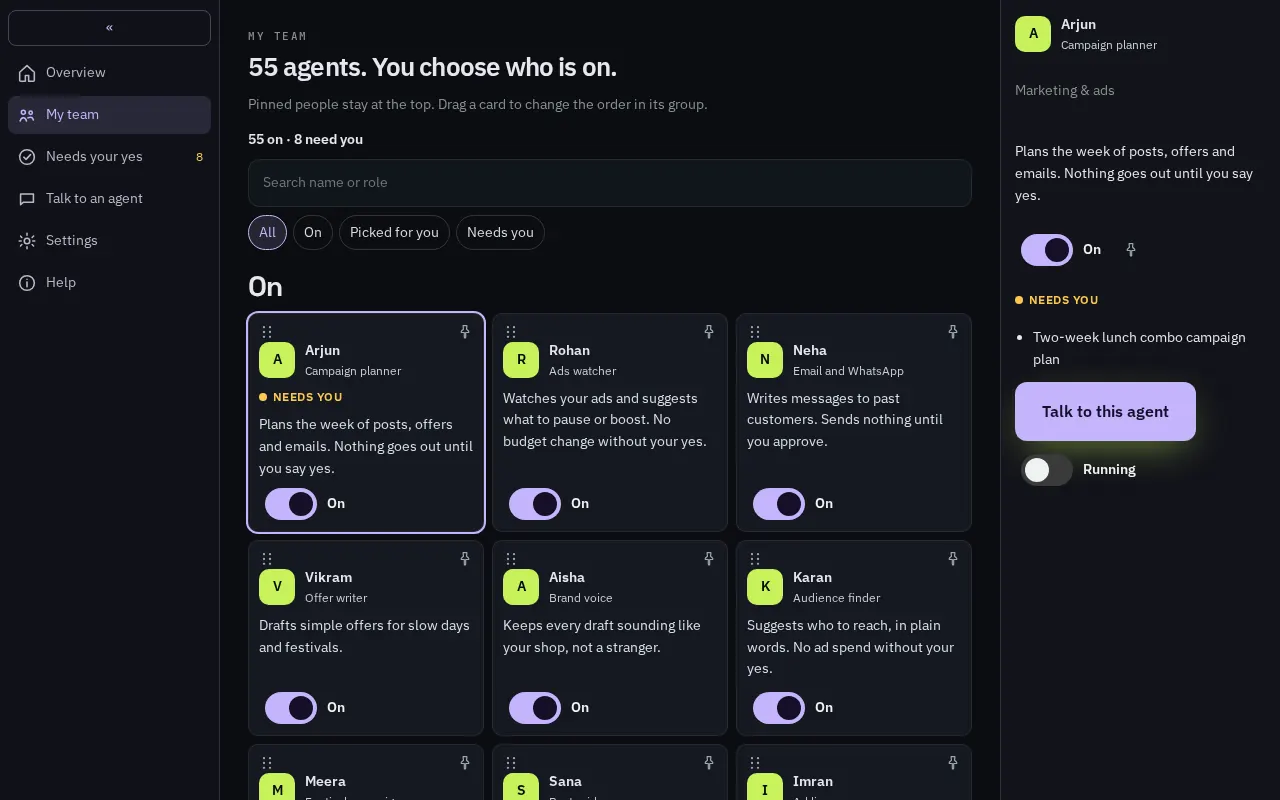
AI Time Machine does not answer phone calls. Its Support agents draft written replies (chat, email, WhatsApp) that you approve. AI Time Machine is a set of 55 ready-made agents in 8 teams that draft everyday sales, support, marketing, content, SEO, operations and money tasks for small businesses, with every draft approved by you. If you need an AI voice receptionist agent for saas, the build guide and repositories above are the better route.
Frequently asked questions
Do callers accept talking to an AI receptionist?
Most accept it for simple tasks when the agent is fast, clear and offers a human. Disclose that it is an AI assistant.
What latency is acceptable for a voice agent?
Replies that start within about a second feel conversational; longer pauses cause callers to talk over the agent.
Can it speak more than one language?
Yes, most modern speech models handle several languages, but test accents and names in each one.
Should a SaaS company build or buy its support agent?
If your help desk already offers a good AI agent, buying is faster. Build when you need deep product actions, such as changing account settings, that vendors cannot reach.
Can a small saas business build an AI voice receptionist agent for saas without developers?
Partly. No-code tools such as n8n, Dify or Langflow can connect a model to Product analytics and email for a first version. Integrations with CRM, approvals and testing usually need some technical help.
Sources and further reading
- Building effective agents — Anthropic
- A practical guide to building agents — OpenAI
- AI Risk Management Framework — NIST
- OWASP Top 10 for LLM Applications — OWASP GenAI Security Project
- Function calling guide — OpenAI
- Retrieval-Augmented Generation for Knowledge-Intensive NLP Tasks — Lewis et al., arXiv 2005.11401
- Model Context Protocol — modelcontextprotocol.io
- AICPA & CIMA — AICPA & CIMA
- General Data Protection Regulation (text) — gdpr-info.eu
Need an AI voice receptionist agent for saas? Tell us what you need
Tell us what you want the agent to do. We read every request and reply by email, usually within two business days, with an honest view of whether our ready-made agents fit or what a custom build would involve.
Or start today with 55 ready-made AI agents
AI Time Machine gives a small business 55 agents in 8 teams (sales, support, marketing, content, SEO, operations, money and a CEO office). They draft the work, you approve it, and they use the AI provider key you connect. One-time payment, no subscription.