Operations agent · Accounting firms
AI Appointment Scheduling Agent for Accounting Firms
An AI appointment scheduling agent for accounting firms is a language-model agent that books, reschedules and reminds appointments within your rules for accounting, bookkeeping and tax firms. It works in tools such as Booking system or calendar and Practice management, follows written rules for accounting firms, and leaves money, terms and personal data decisions to a person.
What is an AI appointment scheduling agent for accounting firms?
Accounting firms face seasonal peaks, document chasing and repetitive client questions, all under professional standards. An AI appointment scheduling agent for accounting firms applies the AI appointment scheduling agent idea to that setting: scheduling looks simple but involves rules: service lengths, buffers, staff skills, locations and deposits. An agent applies those rules conversationally and keeps the calendar accurate.
For accounting, bookkeeping and tax firms, the people on the other side are clients. The agent has to speak their language, respect the rules of the sector and work inside the systems the team already uses rather than adding another dashboard.
What does an AI appointment scheduling agent for accounting firms do?
Its core job in accounting firms: it books, reschedules and reminds appointments within your rules. A common operations task for accounting, bookkeeping and tax firms: the agent chases missing documents and tracks engagements against deadlines. For example: Clients with returns due in 14 days and missing documents get automatic, polite reminders.
Tasks it can take on for accounting, bookkeeping and tax firms
- Offer available slots that follow booking rules
- Book, reschedule and cancel
- Send confirmations and reminders
- Collect intake details before the visit
- Fill cancellations from a waitlist
- Sync with staff calendars
Day-to-day pressures in accounting firms
- Chasing clients for documents
- Tax-season overload
- Repetitive client questions
- Manual data entry from statements and receipts
How does an AI appointment scheduling agent for accounting firms work?
Recommended architecture: single agent with tools. The model runs a loop: read the request, decide which tool to call, read the tool result, and repeat until it can answer or needs a person. This is the reason-and-act (ReAct) pattern most frameworks implement.
Why this pattern fits: requests vary a lot from one conversation to the next, so a fixed script would break. A tool loop lets the agent take a different path each time while the tools themselves stay narrow and safe. Anthropic's guide to agent design makes the same point: start with the simplest pattern that works and add autonomy only when it clearly helps (Anthropic: Building effective agents).
| Component | Role in this agent | Example options |
|---|---|---|
| Language model | Reads the request, decides the next step and writes drafts | GPT, Claude, Gemini, or open-weight models such as Llama, Qwen or Mistral via a gateway like LiteLLM |
| Tools | Actions the agent may take: Booking system or calendar, SMS and WhatsApp, Email, Payments for deposits | Function calling or Model Context Protocol (MCP) servers |
| Industry systems | Where customer records and day-to-day work items live | Practice management, Accounting software, Document portal |
| Knowledge (RAG) | Retrieve service rules and policies. | A vector store such as Chroma or Qdrant, or your database's search |
| Memory | Customer preferences (staff, times) stored on the profile. | CRM or database records; a memory layer such as Mem0 or Zep for longer histories |
| Orchestration | Single agent with tools | n8n or langgraph |
| Guardrails & approval | Exceptions to policy, refunds of deposits and complaints go to staff. | Approval queue, allow-listed actions, logging |
Data the agent needs
- Client engagement letters and scopes
- Chart of accounts and categorisation rules
- Tax deadlines and checklists
- Prior-year workpapers
- Services, durations and buffers
- Staff schedules and skills
What does an AI appointment scheduling agent for accounting firms workflow look like?
A typical run, from trigger to a logged result in accounting firms:
- Customer asks to book
- Agent identifies service and preferences
- Agent checks availability and offers slots
- Customer picks; agent books and confirms
- Reminders go out; cancellations trigger waitlist offers
How do you build an AI appointment scheduling agent for accounting firms, step by step?
- Define the scope. Pick two or three tasks to automate first (for example: offer available slots that follow booking rules; book, reschedule and cancel). Write down what the agent must never do.
- Collect the knowledge. Gather client engagement letters and scopes and chart of accounts and categorisation rules. Clean, current documents matter more than model choice.
- Choose the stack. Use the single agent with tools pattern. Free options include n8n-io/n8n, langchain-ai/langgraph, openai/openai-agents-js; pick one your team can maintain.
- Connect the tools. Give the agent narrow, least-privilege access to Booking system or calendar, SMS and WhatsApp, Email and Practice management. Start read-only where you can.
- Write the instructions. Write a system prompt with the role, allowed sources, tone, limits and when to hand off. Keep examples of good outputs next to it.
- Add retrieval and memory. Retrieve service rules and policies. Customer preferences (staff, times) stored on the profile.
- Add guardrails and approvals. Exceptions to policy, refunds of deposits and complaints go to staff. Log every tool call and output.
- Evaluate before launch. Simulate 100 booking conversations with edge cases (buffers, time zones, cancellations) and verify the calendar.
- Launch small and monitor. Roll out to one team, channel or segment. Track no-show rate and booking conversion, review failures weekly and expand only when quality holds.
Offer up to three slots for {service} that respect a 15-minute buffer and staff skills. Confirm the date, time and time zone in writing. Send the cancellation policy with the confirmation.For model tool use, see the official guides on OpenAI: Function calling guide and Anthropic: Tool use with Claude. OpenAI's practical guide to building agents covers instructions, tools and guardrails in more depth.
Which free, open-source repos can you use to build an AI appointment scheduling agent for accounting firms?
Each repository below was checked on GitHub on 2026-11-26. Licences differ, and some "fair-code" or source-available licences limit commercial hosting, so read the licence before you ship.
| Repository | What it is | Licence | Language |
|---|---|---|---|
| n8n-io/n8n | Workflow automation platform with AI agent nodes, self-hostable | Custom / source-available (read the repo licence) | TypeScript |
| langchain-ai/langgraph | Library for stateful, controllable agent graphs with human-in-the-loop support | MIT | Python |
| openai/openai-agents-js | OpenAI's TypeScript SDK for agents, handoffs, guardrails and voice | MIT | TypeScript |
| activepieces/activepieces | Open-source workflow automation with AI agent steps and MCP connectors | Custom / source-available (read the repo licence) | TypeScript |
| livekit/agents | Framework for real-time voice and video AI agents | Apache-2.0 | Python |
Which AI platforms offer AI appointment scheduling agents?
If you would rather buy than build, these commercial products offer agents or features for this job. We list them for reference only; we are not affiliated with them, and features and pricing change, so check each vendor's site.
| Platform | Type |
|---|---|
| Reclaim.ai | AI calendar scheduling |
| Podium | Messaging, reviews and lead capture for local business |
| Retell AI | Voice AI agent platform |
| Lindy | No-code AI assistants and agents |
Build, buy, or start with ready-made agents?
| Option | Effort | Cost model | Best for |
|---|---|---|---|
| Build with open source | High: engineering, hosting, evaluation | Free code; you pay for models and hosting | Teams with developers that need full control or custom integrations |
| Commercial agent platform | Medium: configuration and integration | Usually subscription or per-conversation pricing | Companies already on that vendor's suite |
| AI Time Machine (55 ready-made agents) | Low: sign in, connect your own AI key, choose agents | One-time payment | Small businesses that want drafts for everyday sales, support, marketing and admin work, approved by a person |
How do you measure an AI appointment scheduling agent for accounting firms?
Measure outcomes, not activity. Set a baseline before launch so you can show the change:
| Metric | How to measure it |
|---|---|
| No-show rate | Missed appointments divided by bookings |
| Booking conversion | Enquiries that become bookings |
| Calendar utilisation | Booked hours versus available hours |
| Documents received on time | Clients who submit by the requested date |
| Returns filed before deadline | Engagements completed early |
What are the risks of an AI appointment scheduling agent for accounting firms, and how do you control them?
| Risk | Control |
|---|---|
| Double bookings | Lock slots during booking and use the calendar as the single source of truth |
| Wrong time zones | Confirm time zone and send calendar invites |
| Collecting sensitive intake data | Ask only what is needed and store it in the right system |
Rules and standards to check in accounting firms
- Professional standards for accountants (AICPA & CIMA)
- IFRS and local accounting standards (IFRS Foundation)
- Tax authority rules and deadlines (IRS)
This is general information, not legal advice. Requirements depend on your country, state and use case.
General AI security risks such as prompt injection, data leakage and excessive agent permissions are catalogued in the OWASP GenAI Security Project: OWASP Top 10 for LLM Applications. For governance, the NIST: AI Risk Management Framework is a widely used framework.
Can AI Time Machine help with operations work in accounting firms?
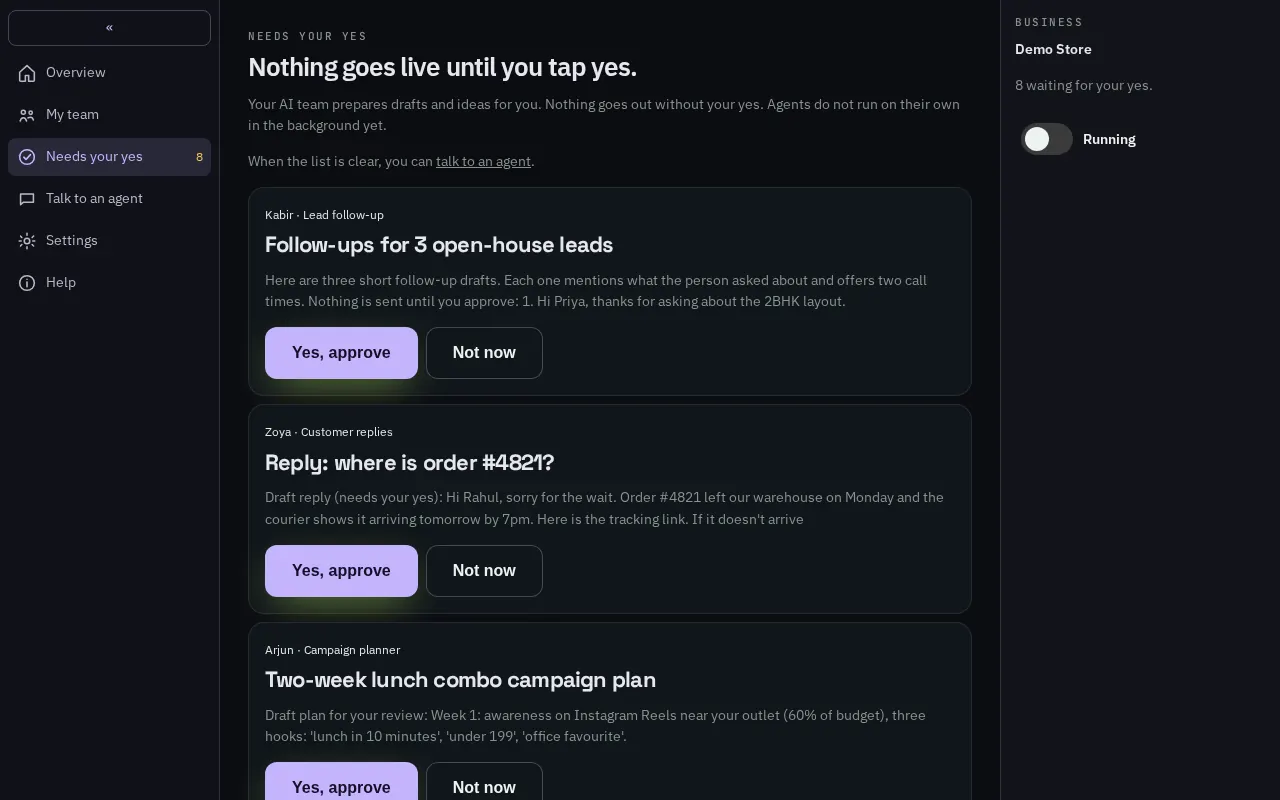
AI Time Machine is a set of 55 ready-made AI agents in 8 teams for small businesses. It is not a custom agent builder and does not connect to Booking system or calendar on its own. The agents closest to this job draft work in their role, using the AI provider key you connect, and nothing goes out until you approve it:
- Shreya, Task reminders (Ops): Nudges you about what you already said yes to.
- Kiara, Reminder messages (Sales): Writes polite reminders. They wait in your yes queue.
- Arnav, Week plan (Ops): Lays the week out on one page.
Frequently asked questions
Can an AI book appointments over WhatsApp?
Yes, via the WhatsApp Business API connected to your calendar or booking system.
Does it reduce no-shows?
Timely reminders with easy rescheduling usually reduce no-shows.
Can it handle multiple staff and locations?
Yes, if your booking rules and calendars are set up clearly.
Can an AI agent prepare tax returns?
It can collect documents, categorise data and draft figures, but a qualified professional must review and sign off.
Can a small accounting firms business build an AI appointment scheduling agent for accounting firms without developers?
Partly. No-code tools such as n8n, Dify or Langflow can connect a model to Practice management and email for a first version. Integrations with Accounting software, approvals and testing usually need some technical help.
Sources and further reading
- Building effective agents — Anthropic
- A practical guide to building agents — OpenAI
- ReAct: Synergizing Reasoning and Acting in Language Models — Yao et al., arXiv 2210.03629
- AI Risk Management Framework — NIST
- OWASP Top 10 for LLM Applications — OWASP GenAI Security Project
- Function calling guide — OpenAI
- Retrieval-Augmented Generation for Knowledge-Intensive NLP Tasks — Lewis et al., arXiv 2005.11401
- Tool use with Claude — Anthropic
- AICPA & CIMA — AICPA & CIMA
- IFRS Standards — IFRS Foundation
- Internal Revenue Service — IRS
Need an AI appointment scheduling agent for accounting firms? Tell us what you need
Tell us what you want the agent to do. We read every request and reply by email, usually within two business days, with an honest view of whether our ready-made agents fit or what a custom build would involve.
Or start today with 55 ready-made AI agents
AI Time Machine gives a small business 55 agents in 8 teams (sales, support, marketing, content, SEO, operations, money and a CEO office). They draft the work, you approve it, and they use the AI provider key you connect. One-time payment, no subscription.